Restoring consumable purchases won't work in Google's Billing Client 8



Issue Description
Starting on Billing Client 8, Google removed the ability to query consumed one-time purchases through Google's Billing Client library. This means that our SDKs using that version of Billing Client won't be able to restore these purchases. This affects the following versions:
| RevenueCat SDK | Version using Billing Client 8+ |
|---|---|
| purchases-android | 9.0.0 and up |
| react-native-purchases | 9.0.0 and up |
| purchases-flutter | 9.0.0 and up |
| cordova-plugin-purchases | 7.0.0 and up |
| purchases-unity | 8.0.0 and up |
| purchases-capacitor | 11.0.0 and up |
| purchases-kmp | 2.0.0 and up |
This situation can cause problems if both of the following are true:
-
Your app DOESN'T have an account system Your app relies on RevenueCat’s anonymous user system, so users can't log in to recover their purchases.
-
Your app uses (or has ever used) one-time products that were consumed RevenueCat automatically consumes purchases for products that are configured as consumables in the RevenueCat dashboard.
In this scenario, these users will have anonymous user ids that won't be easily recoverable and won't be able to recover their purchases through the Billing Client, so those purchases can not be recovered.
Double-check that any non-consumable products are correctly set up as non-consumable in your RevenueCat dashboard (Product catalog → Products) so they are not consumed going forward. Misconfigured one-time products can be consumed automatically, which contributes to the same restore limitations described above. For an overview of consumable vs. non-consumable IAPs, see non-subscription purchases.
Workarounds
Backups
We found there is no good way to recover these purchases with Billing client 8. Currently the only way to lower the number of times users will run into issues restoring purchases is by being able to recover the RevenueCat anonymous user id used in previous installations. In order to do that, we recommend that you make sure you have configured backups correctly for your apps. We have written some documentation on the topic here.
So right now, for everyone affected by this issue we would recommend to:
- Stay in major 8 of our SDK which uses Billing client 7. We will continue to bring important fixes to the major 8 until Billing client 8 is mandatory next year.
- Make sure backups for your app work and include the RevenueCat Shared Preferences file as mentioned in the docs
For users that have a backup performed in this situation and have a device compatible with backups, they would recover the RevenueCat anonymous user id, effectively recovering all their purchases as well.
Note that this solution won't fix all cases, since there are situations and devices where backups won't work.
Transferring purchases using Order ID
For situations where backups are not effective, you can transfer purchases using the Order ID.
Customers can find their Order ID (which begins with GPA...) in their purchase confirmation email. This identifier, along with the customer's app user ID, is required to restore purchases using either of the methods below.
Manual transfer via dashboard
Once you have the Order ID and the current customer's app user ID:
- Search for it in the RevenueCat dashboard to locate the customer that did that purchase
- From the dashboard, you can transfer the purchase to the new app user ID
Transfer via API
Alternatively, you can use the Restore by Order ID API endpoint to programmatically restore purchases. This endpoint requires a secret API V2 key with read and write permissions on the 'Customers Configuration'. For more information on creating API V2 keys, see our API Keys documentation.
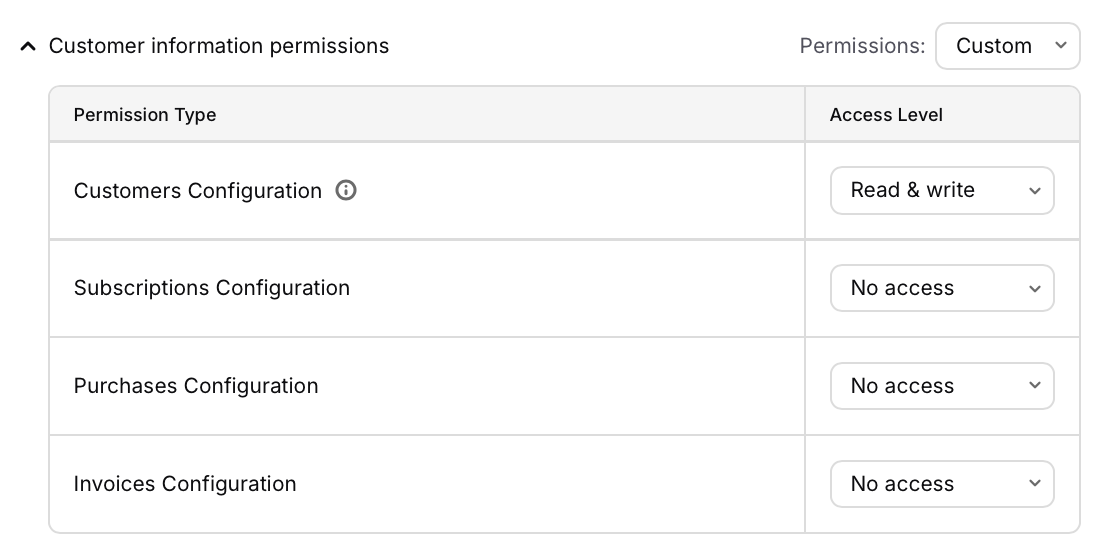
This endpoint can only be used when the original purchaser of the consumed one-time purchase was anonymous. As a result, this endpoint will alias the two app user IDs together.