Granting Ad Rewards
Reward users for completing AdMob rewarded ads, verified server-side by RevenueCat



Grant a reward to users when they complete an AdMob rewarded or rewarded interstitial ad. RevenueCat verifies each reward server-side using AdMob Server-Side Verification (SSV) before granting it, so rewards can't be spoofed by a tampered client. You configure what each ad unit grants in the RevenueCat dashboard — no backend of your own required.
Verified rewards can grant in-app currency, a temporary entitlement, or both. An ad unit can have one in-app currency reward and multiple entitlement rewards at the same time — completing the ad grants all of them together.
This feature is currently in beta.
How it works
- A user completes a rewarded ad.
- AdMob sends an SSV callback to RevenueCat, with the user attached by the SDK.
- RevenueCat verifies the reward and grants a reward based on your configuration.
- The SDK reports the verified result to your app.
To measure the funnel before step 1, track the prompt that offered the ad and the user's acceptance of it.
Prerequisites
- The AdMob Adapter SDK is installed and the RevenueCat SDK is configured.
- SDK minimums:
purchases-ios5.89.0+ (iOS 15+),purchases-android10.19.0+ with the legacy AdMob adapter,purchases-android10.23.0+ with the Next-Gen AdMob adapter,purchases_flutter10.18.0+ withpurchases_admob_flutter,react-native-purchases10.15.0+ with the matchingreact-native-purchases-admob, orpurchases-unity9.15.0+ withcom.revenuecat.purchases-admob-unity. - Your AdMob account is connected to RevenueCat so your rewarded ad units sync to the dashboard.
Step 1: Configure ad units in AdMob
For each rewarded ad unit you want to grant a reward for, enable Server-side verification in the AdMob console and set the SSV callback URL to:
https://api.revenuecat.com/v1/incoming-webhooks/admob-ssv-rewarded
This is a single, shared endpoint — use the same URL for every ad unit. RevenueCat resolves the ad unit and the user from data the SDK attaches at show time. See Google's guide on setting up SSV for where to enter the URL.

Step 2: Configure the reward in the RevenueCat dashboard
On the Rewards page (under Ads) in your RevenueCat dashboard, add a rule for each reward you want an ad unit to grant. Select New reward, then choose a Reward type in the dialog: Entitlement or In-app currency. An ad unit can have rewards of both types.
If a rewarded ad unit is missing from the Ad unit list, select Refresh ad units.
In-app currency rewards
With In-app currency selected as the reward type:
- Select a synced rewarded ad unit.
- Choose the in-app currency to grant.
- Enter the amount (a positive whole number).
- Select Add reward.
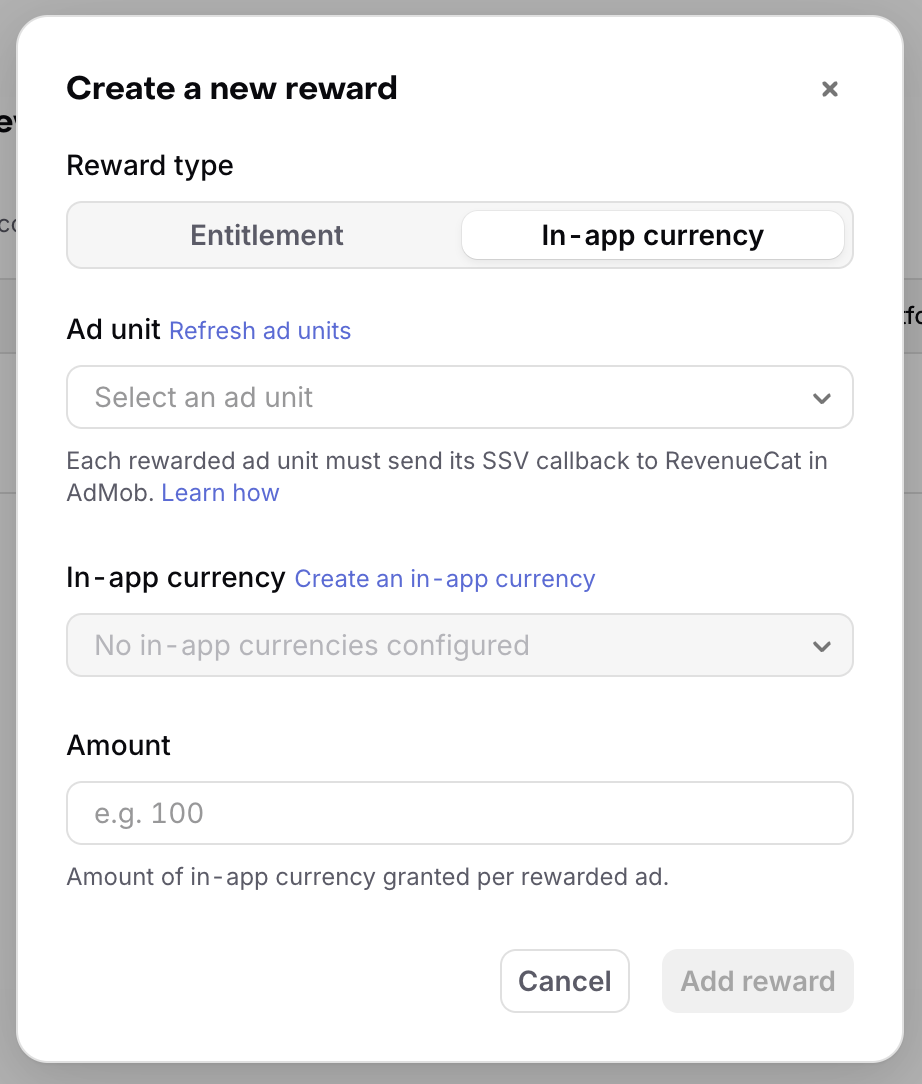
RevenueCat grants this amount every time a reward from that ad unit is verified. An ad unit can have at most one in-app currency reward.
Entitlement rewards
With Entitlement selected as the reward type:
- Select a synced rewarded ad unit.
- Choose the entitlement to grant. Only active (non-archived) entitlements are selectable — create one first if you don't see it in the list.
- Enter a duration and pick a unit (minutes, hours, days, weeks, months, or years). The minimum duration is 30 minutes.
- Select Add reward.
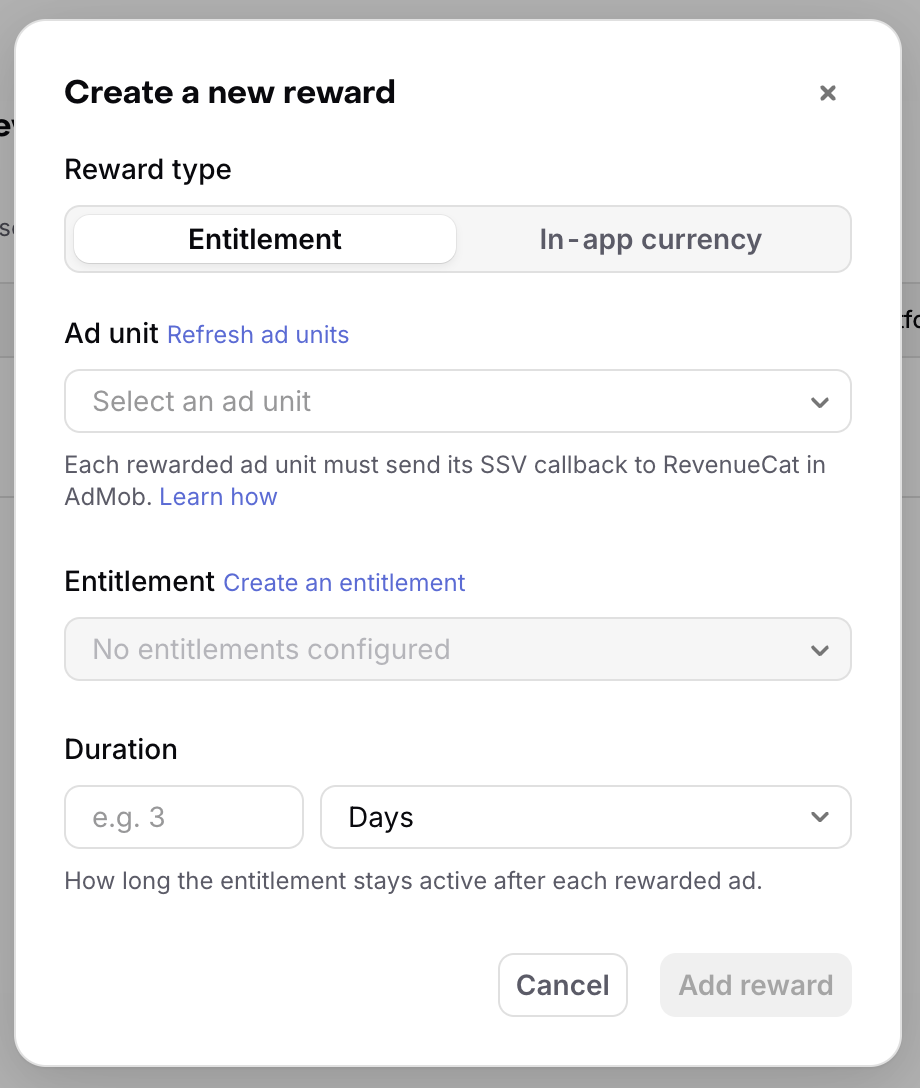
RevenueCat grants the entitlement for the configured duration every time a reward from that ad unit is verified. An ad unit can have multiple entitlement rewards, but only one reward per entitlement — configure another ad unit if you need different durations for the same entitlement.
Entitlement rewards are verified through AdMob SSV, which is configured per ad unit in your own AdMob account. Google's sample test ad unit IDs aren't part of any account, so SSV can't be enabled on them.
Step 3: Implement it in your app
Enable verification on each ad after it loads (on React Native, when you create it), then present it with the verification callbacks.
On iOS, you can also fetch configured rewards to describe the offer before presenting the ad, as shown in the Swift example below.
An ad can grant more than one reward at once. Verification exposes the primary reward and any additional rewards separately, so check both:
- The primary reward — inspect it directly for its type.
- Additional rewards — a list of the same reward type, holding everything beyond the primary reward. Empty when only one reward was granted.
Before delivering the result, the SDK already applies the reward locally: it invalidates the in-app currencies cache for any in-app currency reward, and refreshes customer info for any entitlement reward. You don't need to refresh anything yourself — refetch in-app currency balances only when your UI needs the updated total (see reading balances), and check the entitlement status as usual.
- Swift
- Kotlin (Legacy AdMob)
- Kotlin (Next-Gen AdMob)
- Flutter
- React Native
- Unity
import RevenueCat
import RevenueCatAdMob

let adUnitID = "AD_UNIT_ID"

// Fetch configured rewards to describe the offer before showing the ad.
let adRewards = await Purchases.shared.adRewards(forAdUnitId: adUnitID)
let offerTitle = formatRewardOffer(adRewards) // Your app's formatting method.

RewardedAd.loadAndTrack(
    withAdUnitID: adUnitID,
    request: Request(),
    placement: "bonus_coins",
    fullScreenContentDelegate: self
) { ad, error in
    if error != nil { return }
    guard let ad else { return }

    // Enable RevenueCat reward verification before presenting the ad.
    ad.enableRewardVerification()
    self.rewardedAd = ad
}

// Later, present the ad with verification callbacks:
rewardedAd?.present(
    from: self,
    rewardVerificationStarted: {
        // RevenueCat is verifying the reward server-side.
        // Show a loading state here if you gate the reward on the result.
    },
    rewardVerificationCompleted: { result in
        guard let primaryReward = result.verifiedReward else {
            // Verification did not succeed — for example AdMob rejected the reward,
            // the callback timed out, or a network error occurred. Do not grant the
            // reward client-side as a fallback; let the user retry with another ad.
            return
        }

        // An ad can grant more than one reward; handle the primary reward and any others the same way.
        for reward in [primaryReward] + result.moreRewards {
            self.handleAdReward(reward)
        }
    }
)

func handleAdReward(_ reward: RevenueCat.AdReward) {
    if let virtualCurrency = reward.virtualCurrency {
        // RevenueCat already granted the reward server-side and invalidated the local
        // virtual currencies cache; the amount and currency come from the reward rule
        // you configured in the dashboard.
        print("Granted \(virtualCurrency.amount) \(virtualCurrency.code)")

        // Refetch balances only if your UI needs the updated total.
        Purchases.shared.getVirtualCurrencies { _, _ in
            // Update your UI with the refreshed balances.
        }
    } else if let entitlement = reward.entitlement {
        // RevenueCat already granted the entitlement server-side and refreshed customer
        // info before delivering this result — check entitlement status as usual.
        print("Granted entitlement \(entitlement.identifier) until \(entitlement.expiresAt)")
    }
}
import com.revenuecat.purchases.Purchases
import com.revenuecat.purchases.admob.* // AdMob helper extensions
import com.revenuecat.purchases.ads.rewardverification.VerifiedReward
import com.revenuecat.purchases.getVirtualCurrenciesWith

fun loadRewardedAd(context: Context) {
    Purchases.sharedInstance.adTracker.loadAndTrackRewardedAd(
        context = context,
        adUnitId = "AD_UNIT_ID",
        adRequest = AdRequest.Builder().build(),
        placement = "bonus_coins",
        loadCallback = object : RewardedAdLoadCallback() {
            override fun onAdLoaded(ad: RewardedAd) {
                // Enable RevenueCat reward verification before presenting the ad.
                ad.enableRewardVerification()
                rewardedAd = ad
            }

            override fun onAdFailedToLoad(error: LoadAdError) {
                rewardedAd = null
            }
        },
    )
}

// Later, show the ad with verification callbacks:
fun showRewardedAd(activity: Activity) {
    rewardedAd?.show(
        activity = activity,
        rewardVerificationStarted = {
            // RevenueCat is verifying the reward server-side.
            // Show a loading state here if you gate the reward on the result.
        },
        rewardVerificationCompleted = { result ->
            rewardedAd = null

            val primaryReward = result.verifiedReward
            if (primaryReward != null) {
                // An ad can grant more than one reward; handle the primary reward and any others the same way.
                (listOf(primaryReward) + result.moreRewards).forEach(::handleAdReward)
            } else {
                // Verification did not succeed — for example AdMob rejected the reward,
                // the callback timed out, or a network error occurred. Do not grant the
                // reward client-side as a fallback; let the user retry with another ad.
            }
        },
    )
}

fun handleAdReward(reward: VerifiedReward) {
    when (reward) {
        is VerifiedReward.VirtualCurrency -> {
            // RevenueCat already granted the reward server-side and invalidated the local
            // virtual currencies cache; the amount and currency come from the reward rule
            // you configured in the dashboard.
            println("Granted ${reward.amount} ${reward.code}")

            // Refetch balances only if your UI needs the updated total.
            Purchases.sharedInstance.getVirtualCurrenciesWith(
                onError = { /* Handle error */ },
                onSuccess = { /* Update your UI with the refreshed balances */ },
            )
        }
        is VerifiedReward.Entitlement -> {
            // RevenueCat already granted the entitlement server-side and refreshed customer
            // info before delivering this result — check entitlement status as usual.
            println("Granted entitlement ${reward.identifier} until ${reward.expiresAt}")
        }
        else -> Unit
    }
}
import com.revenuecat.purchases.Purchases
import com.revenuecat.purchases.admob.nextgen.* // AdMob Next-Gen helper extensions
import com.revenuecat.purchases.ads.rewardverification.VerifiedReward
import com.revenuecat.purchases.getVirtualCurrenciesWith

fun loadRewardedAd() {
    val adRequest = AdRequest.Builder("AD_UNIT_ID").build()

    Purchases.sharedInstance.adTracker.loadAndTrackRewardedAd(
        adRequest = adRequest,
        placement = "bonus_coins",
        loadCallback = object : AdLoadCallback<RewardedAd> {
            override fun onAdLoaded(ad: RewardedAd) {
                // Enable RevenueCat reward verification before presenting the ad.
                ad.enableRewardVerification()
                rewardedAd = ad
            }

            override fun onAdFailedToLoad(error: LoadAdError) {
                rewardedAd = null
            }
        },
    )
}

// Later, show the ad with verification callbacks:
fun showRewardedAd(activity: Activity) {
    rewardedAd?.show(
        activity = activity,
        rewardVerificationStarted = {
            // RevenueCat is verifying the reward server-side.
            // Show a loading state here if you gate the reward on the result.
        },
        rewardVerificationCompleted = { result ->
            rewardedAd = null

            val primaryReward = result.verifiedReward
            if (primaryReward != null) {
                // An ad can grant more than one reward; handle the primary reward and any others the same way.
                (listOf(primaryReward) + result.moreRewards).forEach(::handleAdReward)
            } else {
                // Verification did not succeed — for example AdMob rejected the reward,
                // the callback timed out, or a network error occurred. Do not grant the
                // reward client-side as a fallback; let the user retry with another ad.
            }
        },
    )
}

fun handleAdReward(reward: VerifiedReward) {
    when (reward) {
        is VerifiedReward.VirtualCurrency -> {
            // RevenueCat already granted the reward server-side and invalidated the local
            // virtual currencies cache; the amount and currency come from the reward rule
            // you configured in the dashboard.
            println("Granted ${reward.amount} ${reward.code}")

            // Refetch balances only if your UI needs the updated total.
            Purchases.sharedInstance.getVirtualCurrenciesWith(
                onError = { /* Handle error */ },
                onSuccess = { /* Update your UI with the refreshed balances */ },
            )
        }
        is VerifiedReward.Entitlement -> {
            // RevenueCat already granted the entitlement server-side and refreshed customer
            // info before delivering this result — check entitlement status as usual.
            println("Granted entitlement ${reward.identifier} until ${reward.expiresAt}")
        }
        else -> Unit
    }
}
import 'package:google_mobile_ads/google_mobile_ads.dart';
import 'package:purchases_admob_flutter/purchases_admob_flutter.dart';
import 'package:purchases_flutter/purchases_flutter.dart';

RewardedAd? _rewardedAd;

Future<void> loadRewardedAd() => RevenueCatAdMob.loadAndTrackRewardedAd(
      adUnitId: 'AD_UNIT_ID',
      request: const AdRequest(),
      placement: 'bonus_coins',
      rewardedAdLoadCallback: RewardedAdLoadCallback(
        onAdLoaded: (ad) async {
          // Attaches a RevenueCat token to AdMob's server-side verification
          // options. Call after the ad loads and before showing it.
          await ad.enableRewardVerification();
          _rewardedAd = ad;
        },
        onAdFailedToLoad: (error) => _rewardedAd = null,
      ),
    );

// Present the ad. When the user earns the reward, the adapter polls RevenueCat
// for the verified result and calls onRewardVerificationCompleted at most once, after the reward is earned.
Future<void> showRewardedAd() async {
  await _rewardedAd?.showWithRewardVerification(
    onRewardVerificationStarted: () {
      // Optional: show a spinner while the reward is verified.
    },
    onRewardVerificationCompleted: (result) {
      if (result.failed || result.reward == null) {
        // Verification did not succeed — for example AdMob rejected the reward,
        // the callback timed out, or a network error occurred. Do not grant the
        // reward client-side as a fallback; let the user retry with another ad.
        return;
      }

      // An ad can grant more than one reward; handle the primary reward and any others the same way.
      for (final reward in [result.reward!, ...result.moreRewards]) {
        handleAdReward(reward);
      }
    },
  );
}

void handleAdReward(VerifiedReward reward) {
  if (reward is VerifiedVirtualCurrencyReward) {
    // RevenueCat already granted the reward server-side and invalidated the local
    // virtual currencies cache; the amount and currency come from the reward rule
    // you configured in the dashboard.
    print('Granted ${reward.amount} ${reward.code}');

    // Refetch balances only if your UI needs the updated total.
    Purchases.getVirtualCurrencies();
  } else if (reward is VerifiedEntitlementReward) {
    // RevenueCat already granted the entitlement server-side and refreshed customer
    // info before delivering this result — check entitlement status as usual.
    print('Granted entitlement ${reward.identifier} until ${reward.expiresAt}');
  } else if (reward is VerifiedNoReward) {
    // Verification succeeded but the reward rule granted nothing.
  } else if (reward is VerifiedUnsupportedReward) {
    // The reward type is newer than this SDK version; update purchases_flutter.
  }
}
import { RewardedAdEventType } from "react-native-google-mobile-ads";
import Purchases, { VerifiedReward } from "react-native-purchases";
import { RevenueCatAdMob } from "react-native-purchases-admob";

// enableRewardVerification attaches a RevenueCat token to AdMob's server-side
// verification options when the ad request is created.
const rewarded = await RevenueCatAdMob.createRewardedAd("AD_UNIT_ID", {
  placement: "bonus_coins",
  enableRewardVerification: true,
});

rewarded.addAdEventListener(RewardedAdEventType.LOADED, () => setReady(true));
rewarded.load();

// Present the ad. When the user earns the reward, the adapter polls RevenueCat
// for the verified result and calls onRewardVerificationCompleted at most once, after the reward is earned.
await RevenueCatAdMob.showWithRewardVerification(rewarded, {
  onRewardVerificationStarted: () => {
    // Optional: show a spinner while the reward is verified.
  },
  onRewardVerificationCompleted: (result) => {
    if (result.failed || !result.reward) {
      // Verification did not succeed — for example AdMob rejected the reward,
      // the callback timed out, or a network error occurred. Do not grant the
      // reward client-side as a fallback; let the user retry with another ad.
      return;
    }

    // An ad can grant more than one reward; handle the primary reward and any others the same way.
    for (const reward of [result.reward, ...result.moreRewards]) {
      handleAdReward(reward);
    }
  },
});

function handleAdReward(reward: VerifiedReward) {
  switch (reward.type) {
    case "virtual_currency":
      // RevenueCat already granted the reward server-side and invalidated the local
      // virtual currencies cache; the amount and currency come from the reward rule
      // you configured in the dashboard.
      console.log(`Granted ${reward.amount} ${reward.code}`);

      // Refetch balances only if your UI needs the updated total.
      Purchases.getVirtualCurrencies();
      break;
    case "entitlement":
      // RevenueCat already granted the entitlement server-side and refreshed customer
      // info before delivering this result — check entitlement status as usual.
      console.log(`Granted entitlement ${reward.identifier} until ${reward.expiresAt}`);
      break;
    case "no_reward":
      // Verification succeeded but the reward rule granted nothing.
      break;
    case "unsupported_reward":
      // The reward type is newer than this SDK version; update react-native-purchases.
      break;
  }
}
using GoogleMobileAds.Api;
using RevenueCat;
using RevenueCat.AdMob;
using UnityEngine;

private RewardedAd _rewarded;

void LoadRewardedAd()
{
    RevenueCatAdMob.LoadAndTrackRewardedAd("AD_UNIT_ID", new AdRequest(), (ad, error) =>
    {
        if (ad == null) return;

        // Attaches a RevenueCat token to AdMob's server-side verification
        // options. Call after the ad loads and wait for the callback before
        // showing; showing earlier delivers a failed verification.
        ad.EnableRewardVerification(enabled =>
        {
            _rewarded = ad;
        });
    }, placement: "bonus_coins");
}

// Show the ad. When the user earns the reward, the adapter polls RevenueCat for
// the verified result and calls `completed` at most once, after the reward is earned.
void ShowRewardedAd()
{
    if (_rewarded == null || !_rewarded.CanShowAd()) return;

    _rewarded.ShowWithRewardVerification(
        completed: result =>
        {
            if (result.Failed || result.Reward == null)
            {
                // Verification did not succeed — for example AdMob rejected the reward,
                // the callback timed out, or a network error occurred. Do not grant the
                // reward client-side as a fallback; let the user retry with another ad.
                return;
            }

            // An ad can grant more than one reward; handle the primary reward and any others the same way.
            HandleAdReward(result.Reward);
            foreach (var extraReward in result.MoreRewards)
            {
                HandleAdReward(extraReward);
            }
        },
        started: () =>
        {
            // Optional: show a spinner while the reward is verified.
        });
}

void HandleAdReward(Purchases.VerifiedReward reward)
{
    switch (reward)
    {
        case Purchases.VerifiedReward.VirtualCurrency virtualCurrency:
            // RevenueCat already granted the reward server-side and invalidated the local
            // virtual currencies cache; the amount and currency come from the reward rule
            // you configured in the dashboard.
            Debug.Log($"Granted {virtualCurrency.Amount} {virtualCurrency.Code}");
            break;
        case Purchases.VerifiedReward.Entitlement entitlement:
            // RevenueCat already granted the entitlement server-side and refreshed customer
            // info before delivering this result — check entitlement status as usual.
            Debug.Log($"Granted entitlement {entitlement.Identifier} until {entitlement.ExpiresAt}");
            break;
        case Purchases.VerifiedReward.NoReward _:
            // Verification succeeded but the reward rule granted nothing.
            break;
        case Purchases.VerifiedReward.Unsupported _:
            // The reward type is newer than this SDK version; update the RevenueCat package.
            break;
    }
}
Rewarded interstitial ads work identically — use RewardedInterstitialAd in place of RewardedAd (on React Native, createRewardedInterstitialAd in place of createRewardedAd).
On React Native, react-native-google-mobile-ads accepts server-side verification options when the ad request is created, before AdMob's response ID exists. The adapter therefore generates the impression ID itself when you create the ad with enableRewardVerification: true, attaches the token to the request, and uses that ID for every tracking event of the ad. Verification tokens are single-use: create a new ad for every verified show instead of calling load() again on the same instance; once a verified ad has loaded, a second load() logs a warning and does nothing.
The adapter also automatically tracks the reward-verification funnel — earned, verified, granted, and failed-to-verify — as events tied to the same ad it already tracks loads, impressions, and revenue for. No extra code is required. This tracking requires purchases-ios 5.89.0+, purchases-android 10.19.0+ with the legacy adapter, purchases-android 10.23.0+ with the Next-Gen adapter, or the Flutter, React Native and Unity adapters.
Manual integration
If you use the AdMob Adapter SDK shown above (available for iOS, Android, Flutter, React Native, and Unity), Step 3 is all you need. Otherwise — on Kotlin Multiplatform (which has no adapter), or on any platform when you integrate Google Mobile Ads directly without the adapter — do it manually, calling the reward verification methods yourself:
- After the ad loads, generate a token with
generateRewardVerificationTokenand attach it to the ad's server-side verification options (your ad network'suserIdandcustomDatafields). - Present the ad.
- When the ad's earned-reward callback fires, call
pollRewardVerificationwith the token's client transaction ID, then handle the result exactly as above (primary reward + additional rewards). - Optionally, pass ad metadata to
pollRewardVerificationso the SDK tracks the reward-verification funnel (earned, verified, granted, or failed to verify) the same way the adapter does automatically in Step 3 — omit it to poll without tracking. This uses the sameAdMediatorName/AdFormattypes as manual ad tracking, and correlates with the ad's other tracked events through a sharedimpressionId.
These methods are ad-library-agnostic: they only produce the userId/customData you hand to whatever server-side verification mechanism your ad SDK exposes. The examples below use an AdMob library such as google_mobile_ads (Flutter), react-native-google-mobile-ads (React Native), and the Google Mobile Ads Unity plugin (Unity). Google Mobile Ads has no Kotlin Multiplatform artifact, so on Kotlin Multiplatform loading and presenting the ad stays platform-specific — wire it behind an expect/actual pair backed by play-services-ads on Android and the GoogleMobileAds SDK on iOS; only the verification calls shown below are shared.
Additional requirements for this path:
- Flutter:
purchases_flutter10.10.1+, plus your AdMob library; you wiregoogle_mobile_adsdirectly instead of installingpurchases_admob_flutter. - React Native:
react-native-purchases10.8.1+, plus your AdMob library; you wirereact-native-google-mobile-adsdirectly instead of installingreact-native-purchases-admob. - Unity:
purchases-unity9.9.0+, plus the Google Mobile Ads Unity plugin; you wire it directly instead of installingcom.revenuecat.purchases-admob-unity. - Kotlin Multiplatform:
purchases-kmp3.9.0+, plus your platform-specific Google Mobile Ads setup. - iOS / Android:
purchases-ios5.89.0+ orpurchases-android10.19.0+; you wire Google Mobile Ads directly instead of installing the adapter.
- Swift
- Kotlin
- Flutter
- React Native
- Unity
- Kotlin MP
// No AdMob adapter required.
import RevenueCat
import GoogleMobileAds

RewardedAd.load(with: "AD_UNIT_ID", request: Request()) { ad, error in
    if error != nil { return }
    guard let ad else { return }

    // Use the loaded ad's response ID as the impression ID, generate a token,
    // and attach it to AdMob's server-side verification options before presenting.
    let impressionId = ad.responseInfo.responseIdentifier ?? ""
    let token = Purchases.shared.generateRewardVerificationToken(impressionId: impressionId)

    let options = ServerSideVerificationOptions()
    options.userIdentifier = token.appUserID
    options.customRewardText = token.customData
    ad.serverSideVerificationOptions = options

    self.rewardedAd = ad
    self.clientTransactionID = token.clientTransactionID
    self.impressionId = impressionId
}

// Later, present the ad. When the user earns the reward, poll RevenueCat for the
// verified result using the token's client transaction ID. Pass trackingMetadata so
// the SDK tracks the reward funnel (earned, verified, granted, failed to verify) the
// same way the AdMob adapter does automatically; omit it to poll without tracking.
rewardedAd?.present(from: self) {
    Task {
        let result = await Purchases.shared.pollRewardVerification(
            clientTransactionID: self.clientTransactionID,
            trackingMetadata: RewardedAdTrackingMetadata(
                networkName: nil,          // e.g., "Google Ads" (optional)
                mediatorName: .adMob,
                adFormat: .rewarded,
                placement: "home_screen",  // Your custom placement ID (optional)
                adUnitId: "AD_UNIT_ID",
                impressionId: self.impressionId
            )
        )

        guard let primaryReward = result.verifiedReward else {
            // Verification did not succeed — for example AdMob rejected the reward,
            // the callback timed out, or a network error occurred. Do not grant the
            // reward client-side as a fallback; let the user retry with another ad.
            return
        }

        // An ad can grant more than one reward; handle the primary reward and any others the same way.
        for reward in [primaryReward] + result.moreRewards {
            self.handleAdReward(reward)
        }
    }
}

func handleAdReward(_ reward: RevenueCat.AdReward) {
    if let virtualCurrency = reward.virtualCurrency {
        // RevenueCat already granted the reward server-side and invalidated the local
        // virtual currencies cache; the amount and currency come from the reward rule
        // you configured in the dashboard.
        print("Granted \(virtualCurrency.amount) \(virtualCurrency.code)")
    } else if let entitlement = reward.entitlement {
        // RevenueCat already granted the entitlement server-side and refreshed customer
        // info before delivering this result — check entitlement status as usual.
        print("Granted entitlement \(entitlement.identifier) until \(entitlement.expiresAt)")
    }
}
import com.revenuecat.purchases.Purchases
import com.revenuecat.purchases.ads.events.types.AdFormat
import com.revenuecat.purchases.ads.events.types.AdMediatorName
import com.revenuecat.purchases.ads.rewardverification.RewardVerificationResult
import com.revenuecat.purchases.ads.rewardverification.RewardedAdTrackingMetadata
import com.revenuecat.purchases.ads.rewardverification.VerifiedReward
import com.revenuecat.purchases.interfaces.PollRewardVerificationCallback

// No AdMob adapter required — call the reward verification methods directly.
fun loadRewardedAd(context: Context) {
    RewardedAd.load(
        context,
        "AD_UNIT_ID",
        AdRequest.Builder().build(),
        object : RewardedAdLoadCallback() {
            override fun onAdLoaded(ad: RewardedAd) {
                // Use the loaded ad's response ID as the impression ID, generate a token,
                // and attach it to AdMob's server-side verification options before showing.
                val responseId = ad.responseInfo.responseId ?: ""
                val token = Purchases.sharedInstance.generateRewardVerificationToken(responseId)

                ad.setServerSideVerificationOptions(
                    ServerSideVerificationOptions.Builder()
                        .setUserId(token.appUserID)
                        .setCustomData(token.customData)
                        .build(),
                )
                rewardedAd = ad
                clientTransactionId = token.clientTransactionId
                impressionId = responseId
            }

            override fun onAdFailedToLoad(error: LoadAdError) {
                rewardedAd = null
            }
        },
    )
}

// Later, show the ad. When the user earns the reward, poll RevenueCat for the
// verified result using the token's client transaction ID. Pass trackingMetadata so
// the SDK tracks the reward funnel (earned, verified, granted, failed to verify) the
// same way the AdMob adapter does automatically; omit it to poll without tracking.
fun showRewardedAd(activity: Activity) {
    rewardedAd?.show(activity, OnUserEarnedRewardListener {
        Purchases.sharedInstance.pollRewardVerification(
            clientTransactionId = clientTransactionId,
            callback = object : PollRewardVerificationCallback {
                override fun onCompleted(result: RewardVerificationResult) {
                    rewardedAd = null

                    val primaryReward = result.verifiedReward
                    if (primaryReward != null) {
                        // An ad can grant more than one reward; handle the primary reward and any others the same way.
                        (listOf(primaryReward) + result.moreRewards).forEach(::handleAdReward)
                    } else {
                        // Verification did not succeed — for example AdMob rejected the reward,
                        // the callback timed out, or a network error occurred. Do not grant the
                        // reward client-side as a fallback; let the user retry with another ad.
                    }
                }
            },
            trackingMetadata = RewardedAdTrackingMetadata(
                networkName = null,          // e.g., "Google Ads" (optional)
                mediatorName = AdMediatorName.AD_MOB,
                adFormat = AdFormat.REWARDED,
                placement = "home_screen",   // Your custom placement ID (optional)
                adUnitId = "AD_UNIT_ID",
                impressionId = impressionId,
            ),
        )
    })
}

fun handleAdReward(reward: VerifiedReward) {
    when (reward) {
        is VerifiedReward.VirtualCurrency -> {
            // RevenueCat already granted the reward server-side and invalidated the local
            // virtual currencies cache; the amount and currency come from the reward rule
            // you configured in the dashboard.
            println("Granted ${reward.amount} ${reward.code}")
        }
        is VerifiedReward.Entitlement -> {
            // RevenueCat already granted the entitlement server-side and refreshed customer
            // info before delivering this result — check entitlement status as usual.
            println("Granted entitlement ${reward.identifier} until ${reward.expiresAt}")
        }
        else -> Unit
    }
}
import 'package:google_mobile_ads/google_mobile_ads.dart';
import 'package:purchases_flutter/purchases_flutter.dart';

RewardedAd.load(
  adUnitId: 'AD_UNIT_ID',
  request: const AdRequest(),
  rewardedAdLoadCallback: RewardedAdLoadCallback(
    onAdLoaded: (ad) async {
      // Use the loaded ad's response ID as the impression ID, then generate a
      // verification token and attach it as AdMob server-side verification
      // options before presenting.
      final impressionId = ad.responseInfo?.responseId ?? '';
      _token = await Purchases.generateRewardVerificationToken(impressionId);
      await ad.setServerSideOptions(ServerSideVerificationOptions(
        userId: _token!.appUserID,
        customData: _token!.customData,
      ));
      _rewardedAd = ad;
      _impressionId = impressionId;
    },
    onAdFailedToLoad: (error) => _rewardedAd = null,
  ),
);

// Later, present the ad. When the user earns the reward, poll RevenueCat for
// the verified result using the token's client transaction ID. Pass
// trackingMetadata so the SDK tracks the reward funnel (earned, verified,
// granted, failed to verify) the same way the AdMob adapter does
// automatically; omit it to poll without tracking.
_rewardedAd?.show(
  onUserEarnedReward: (ad, _) async {
    final result = await Purchases.pollRewardVerification(
      _token!.clientTransactionId,
      trackingMetadata: RewardedAdTrackingMetadata(
        networkName: null, // e.g., "Google Ads" (optional)
        mediatorName: AdMediatorName.adMob,
        adFormat: AdFormat.rewarded,
        placement: 'home_screen', // Your custom placement ID (optional)
        adUnitId: 'AD_UNIT_ID',
        impressionId: _impressionId,
      ),
    );

    if (result.failed || result.reward == null) {
      // Verification did not succeed — for example AdMob rejected the reward,
      // the callback timed out, or a network error occurred. Do not grant the
      // reward client-side as a fallback; let the user retry with another ad.
      return;
    }

    // An ad can grant more than one reward; handle the primary reward and any others the same way.
    for (final reward in [result.reward!, ...result.moreRewards]) {
      handleAdReward(reward);
    }
  },
);

void handleAdReward(VerifiedReward reward) {
  if (reward is VerifiedVirtualCurrencyReward) {
    // RevenueCat already granted the reward server-side and invalidated the local
    // virtual currencies cache; the amount and currency come from the reward rule
    // you configured in the dashboard.
    print('Granted ${reward.amount} ${reward.code}');

    // Refetch balances only if your UI needs the updated total.
    Purchases.getVirtualCurrencies();
  } else if (reward is VerifiedEntitlementReward) {
    // RevenueCat already granted the entitlement server-side and refreshed customer
    // info before delivering this result — check entitlement status as usual.
    print('Granted entitlement ${reward.identifier} until ${reward.expiresAt}');
  } else if (reward is VerifiedNoReward) {
    // Verification succeeded but the reward rule granted nothing.
  } else if (reward is VerifiedUnsupportedReward) {
    // The reward type is newer than this SDK version; update purchases_flutter.
  }
}
import { RewardedAd, RewardedAdEventType } from "react-native-google-mobile-ads";
import Purchases, {
  AdFormat,
  AdMediatorName,
  VerifiedReward,
} from "react-native-purchases";

// react-native-google-mobile-ads doesn't expose AdMob's response id before the
// ad loads (SSV options must be set at request time), so assign your own unique
// impression ID. Reuse it for your RevenueCat ad-tracking calls to correlate.
const impressionId = "YOUR_UNIQUE_IMPRESSION_ID";
const token = await Purchases.generateRewardVerificationToken(impressionId);

const rewarded = RewardedAd.createForAdRequest("AD_UNIT_ID", {
  serverSideVerificationOptions: {
    userId: token.appUserID,
    customData: token.customData,
  },
});

rewarded.addAdEventListener(RewardedAdEventType.LOADED, () => rewarded.show());

// When the user earns the reward, poll RevenueCat for the verified result
// using the token's client transaction ID. Pass trackingMetadata so the SDK
// tracks the reward funnel (earned, verified, granted, failed to verify) the
// same way the AdMob adapter does automatically; omit it to poll without tracking.
rewarded.addAdEventListener(RewardedAdEventType.EARNED_REWARD, async () => {
  const result = await Purchases.pollRewardVerification(token.clientTransactionId, {
    networkName: null, // e.g., "Google Ads" (optional)
    mediatorName: AdMediatorName.adMob,
    adFormat: AdFormat.rewarded,
    placement: "home_screen", // Your custom placement ID (optional)
    adUnitId: "AD_UNIT_ID",
    impressionId,
  });

  if (result.failed || !result.reward) {
    // Verification did not succeed — for example AdMob rejected the reward,
    // the callback timed out, or a network error occurred. Do not grant the
    // reward client-side as a fallback; let the user retry with another ad.
    return;
  }

  // An ad can grant more than one reward; handle the primary reward and any others the same way.
  for (const reward of [result.reward, ...result.moreRewards]) {
    handleAdReward(reward);
  }
});

rewarded.load();

function handleAdReward(reward: VerifiedReward) {
  switch (reward.type) {
    case "virtual_currency":
      // RevenueCat already granted the reward server-side and invalidated the local
      // virtual currencies cache; the amount and currency come from the reward rule
      // you configured in the dashboard.
      console.log(`Granted ${reward.amount} ${reward.code}`);

      // Refetch balances only if your UI needs the updated total.
      Purchases.getVirtualCurrencies();
      break;
    case "entitlement":
      // RevenueCat already granted the entitlement server-side and refreshed customer
      // info before delivering this result — check entitlement status as usual.
      console.log(`Granted entitlement ${reward.identifier} until ${reward.expiresAt}`);
      break;
  }
}
using GoogleMobileAds.Api;

RewardedAd rewardedAd;
string clientTransactionId;
string impressionId;

void LoadRewardedAd()
{
    RewardedAd.Load("AD_UNIT_ID", new AdRequest(), (RewardedAd ad, LoadAdError error) =>
    {
        if (error != null || ad == null) return;

        // Use the loaded ad's response ID as the impression ID, generate a token,
        // and attach it to AdMob's server-side verification options before showing.
        var responseId = ad.GetResponseInfo()?.GetResponseId() ?? "";
        purchases.GenerateRewardVerificationToken(responseId, (token, tokenError) =>
        {
            if (tokenError != null || token == null) return;

            ad.SetServerSideVerificationOptions(new ServerSideVerificationOptions
            {
                UserId = token.AppUserID,
                CustomData = token.CustomData,
            });

            rewardedAd = ad;
            clientTransactionId = token.ClientTransactionId;
            impressionId = responseId;
        });
    });
}

// Later, show the ad. When the user earns the reward, poll RevenueCat for the
// verified result using the token's client transaction ID. Pass trackingMetadata
// so the SDK tracks the reward funnel (earned, verified, granted, failed to
// verify) the same way the AdMob adapter does automatically; omit it to poll
// without tracking.
void ShowRewardedAd()
{
    rewardedAd.Show((Reward reward) =>
    {
        var trackingMetadata = new RewardedAdTrackingMetadata(
            AdTracker.MediatorName.AdMob,
            AdTracker.Format.Rewarded,
            "AD_UNIT_ID",
            impressionId,
            networkName: null,      // e.g., "Google Ads" (optional)
            placement: "home_screen" // Your custom placement ID (optional)
        );
        purchases.PollRewardVerification(clientTransactionId, (result, error) =>
        {
            if (error != null || result.Failed || result.Reward == null)
            {
                // Verification did not succeed — for example AdMob rejected the reward,
                // the callback timed out, or a network error occurred. Do not grant the
                // reward client-side as a fallback; let the user retry with another ad.
                return;
            }

            // An ad can grant more than one reward; handle the primary reward and any others the same way.
            HandleAdReward(result.Reward);
            foreach (var extraReward in result.MoreRewards)
            {
                HandleAdReward(extraReward);
            }
        }, trackingMetadata);
    });
}

void HandleAdReward(Purchases.VerifiedReward reward)
{
    switch (reward)
    {
        case Purchases.VerifiedReward.VirtualCurrency virtualCurrency:
            // RevenueCat already granted the reward server-side and invalidated the local
            // virtual currencies cache; the amount and currency come from the reward rule
            // you configured in the dashboard.
            Debug.Log($"Granted {virtualCurrency.Amount} {virtualCurrency.Code}");
            break;
        case Purchases.VerifiedReward.Entitlement entitlement:
            // RevenueCat already granted the entitlement server-side and refreshed customer
            // info before delivering this result — check entitlement status as usual.
            Debug.Log($"Granted entitlement {entitlement.Identifier} until {entitlement.ExpiresAt}");
            break;
    }
}
// Google Mobile Ads has no Kotlin Multiplatform artifact, so loading and presenting the ad itself
// stays platform-specific (an `expect`/`actual` pair backed by play-services-ads on Android and the
// GoogleMobileAds SDK on iOS). The calls below are the common part shared by both.

// After the ad loads, generate a token and attach it to AdMob's server-side verification options
// through your platform-specific ad controller.
val token = Purchases.sharedInstance.generateRewardVerificationToken(impressionId)
adController.setServerSideVerificationOptions(userId = token.appUserID, customData = token.customData)

// Later, present the ad. When the user earns the reward, poll RevenueCat for the verified result
// using the token's client transaction ID. Pass trackingMetadata so the SDK tracks the reward
// funnel (earned, verified, granted, failed to verify) the same way the AdMob adapter does
// automatically; omit it to poll without tracking.
adController.present(
    onUserEarnedReward = {
        Purchases.sharedInstance.pollRewardVerification(
            clientTransactionId = token.clientTransactionId,
            onCompleted = { result ->
                val reward = result.verifiedReward
                if (result.failed || reward == null) {
                    // Verification did not succeed — for example AdMob rejected the reward, the
                    // callback timed out, or a network error occurred. Do not grant the reward
                    // client-side as a fallback; let the user retry with another ad.
                    return@pollRewardVerification
                }

                // An ad can grant more than one reward; handle the primary reward and any others the same way.
                (listOf(reward) + result.moreRewards).forEach(::handleAdReward)
            },
            trackingMetadata = RewardedAdTrackingMetadata(
                networkName = null,          // e.g., "Google Ads" (optional)
                mediatorName = AdMediatorName.AD_MOB,
                adFormat = AdFormat.REWARDED,
                placement = "home_screen",   // Your custom placement ID (optional)
                adUnitId = "AD_UNIT_ID",
                impressionId = impressionId,
            ),
        )
    }
)

fun handleAdReward(reward: VerifiedReward) {
    when (reward) {
        is VerifiedReward.VirtualCurrency -> {
            // RevenueCat already granted the reward server-side and invalidated the local
            // virtual currencies cache; the amount and currency come from the reward rule
            // you configured in the dashboard.
            println("Granted ${reward.amount} ${reward.code}")
        }
        is VerifiedReward.Entitlement -> {
            // RevenueCat already granted the entitlement server-side and refreshed customer
            // info before delivering this result — check entitlement status as usual.
            println("Granted entitlement ${reward.identifier} until ${reward.expiresAt}")
        }
        else -> Unit
    }
}
Rewarded interstitial ads work identically — use RewardedInterstitialAd in place of RewardedAd.
Track rewards without verification
If you handle rewards yourself without RevenueCat reward verification, use trackAdRewardEarnedUnverified to record the ad SDK's earned-reward callback. This method only tracks the event; it doesn't verify or grant a reward.
When you use the adapter's reward verification or pass tracking metadata to pollRewardVerification, the SDK already tracks this event. Don't also call it manually for the same reward.
Checking entitlement status
An entitlement granted from an ad reward is no different from one granted by a subscription — it's an active entitlement in CustomerInfo with an expiration date. RevenueCat doesn't notify your app the moment it expires, so apply the same rule you already follow for subscriptions: your app decides when to check status, not RevenueCat.
Check the entitlement's active status at the point where you gate access, not once when the reward is granted and never again. A user who unlocks 30 minutes of premium access can leave the relevant screen open well past that window — if you only checked at grant time, they'd keep access after it should have ended.
See Getting Subscription Status for the full set of options for checking and caching entitlement status.
Granted reward events
Rewards earned in debug builds are treated as sandbox events.
For in-app currency, confirm a verified grant in the Customer History timeline, where it appears as an in-app currency transaction:

Opening the entry shows a VIRTUAL_CURRENCY_TRANSACTION event whose "source" is "ad_reward", which distinguishes ad-reward grants from purchases and other sources. The event also includes an ad_transaction_id matching the reward verification.
For entitlements, the grant is active as soon as verification succeeds and shows up in the customer's active entitlements — there's no separate event in Customer History yet.