Sandbox Testing Access



When testing purchases (Test Store or platform sandboxes), you may want to control whether those purchases grant access to entitlements or add to a customer's in-app currency balance. This setting gives you the flexibility to determine how non-production purchases should be handled in your app during testing.
These settings control whether non-production purchases grant entitlements and in-app currency. This includes:
- Test Store purchases (RevenueCat's testing environment)
- Platform sandbox purchases (Apple Sandbox, Google Play testing, Amazon sandbox, etc.)
Both types of testing purchases are treated the same by these settings.
If you're testing with real app user IDs or using test app user IDs that overlap with production ones, it can lead to unexpected behavior or data inconsistencies. This setting gives you control over whether non-production purchases should grant entitlements or in-app currencies.
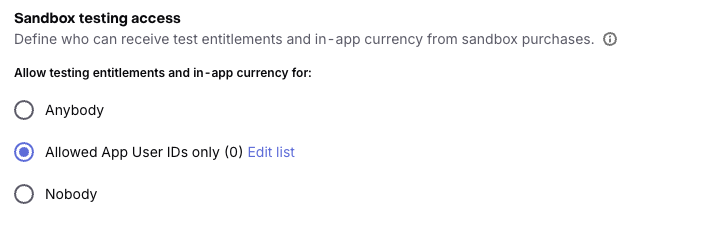
You can configure this setting in the General tab of your project settings:
Allow testing entitlements and in-app currency for
- Anybody (default): All non-production purchases (Test Store and platform sandbox) will grant access to entitlements and add in-app currency, as configured. This is the default behavior and is recommended for early development or internal QA testing.
- Allowed App User IDs only: Only app user IDs that you've added to your allowlist will receive entitlements or in-app currency from non-production purchases. You can add multiple IDs separated by spaces or line breaks. This may be useful when running restricted tests (e.g: Google Play closed testing).
- Nobody: No non-production purchases will grant entitlements or in-app currency. Use this option if you want to prevent all testing from affecting entitlement access or in-app currency balances.
Restricting Testing Access
If you update this setting to restrict access (e.g., changing from Anybody → Allowed App User IDs or Anybody → Nobody), here's what to expect:
- ✅ Non-production purchases will still be recorded.
- All Test Store and platform sandbox purchases continue to be processed and appear in RevenueCat, regardless of this setting.
- ✅ Only customers who meet the new setting will receive access and grants going forward.
- Entitlements and in-app currency will only be granted to customers who match the current access level you've configured.
- 🔁 Previously granted entitlements will be removed.
- If a customer no longer qualifies under the updated setting, any active entitlements previously granted from non-production purchases will be automatically removed.
- 💰 In-app currency already granted will remain.
- If a non-production purchase previously added in-app currency to a customer's balance, that currency will not be removed, even if the customer no longer qualifies under the new setting.